HakkındaKoşullarGizlilikİletişim
 
Güncelleniyor
Land Nav Assistant

Land Nav Assistant

Çıkış Tarihi: 2012-05-18
© Gammon Applications
Land Nav Assistant - QR Code
Sürüm 2.2
4+
App Store'dan İndirin
Sürüm 2.2
4+
App Store'dan İndirin
Çıkış Tarihi: 2012-05-18
© Gammon Applications

iPhone Screenshots

Ekran görüntüsü
Ekran görüntüsü
Ekran görüntüsü
Ekran görüntüsü
Ekran görüntüsü
Ekran görüntüsü
Ekran görüntüsü

iPad Screenshots

Ekran görüntüsü
Ekran görüntüsü
Ekran görüntüsü
Ekran görüntüsü
Ekran görüntüsü
Ekran görüntüsü
Ekran görüntüsü

Açıklama

Land Nav Assistant accepts MGRS (Military Grid) or Latitude / Longitude coordinates and visually navigates you to each point.
This app was designed with Army, Marine, and other military personnel in mind. Use it to correct your Land Nav technique by analyzing your pace count and tendency to veer left and right.
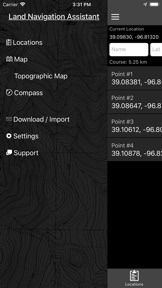
Available Input: 8 digit MGRS, 10 digit MGRS, Lat/Lon decimal, Lat/Lon dms, and map input.
Angles: degrees or mils
Distance: meters/km or feet/miles
Speed: kph or mph
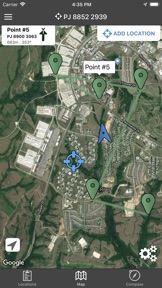
Use the simple arrow interface or map to direct you to your locations. Your distance, direction, speed, and bearing are shown as you navigate.
Long-tap anywhere on the map to get the coordinate for that location. Easily add locations via the Map interface.
Plan your course by ordering points, or use the course optimization tool which will help you calculate the shortest path possible!
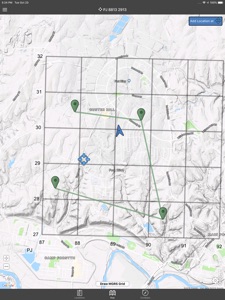
Get distance/direction between two points by tapping the path drawn between them.
Satellite, Terrain, Road, and basic Topographic maps show you, your locations, and lets you enter in new ones.
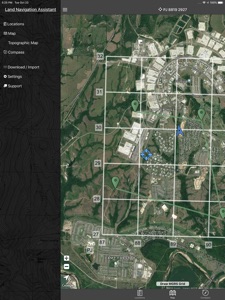
Overlay a 1000m or 100m MGRS grid anywhere on the map.
Displays distance/direction from your currentl location to all points, or between any two points.
Download your Locations as a spreadsheet to save anywhere, or to share with anyone you choose.
Import a large set of locations via the web import utility, available at: https://www.gammonapplications.com/land-navigation-services/import
This app uses the Military Grid Reference System (MGRS) and Latitude / Longitude.
Choose to display your locations as MGRS 10-digit, MGRS 8-digit, or LatLon Decimal.
D:M:S can be input in the format DD:MM:SS followed by the appropriate direction (NSWE). Default direction is N, W.
DO NOT use this application while learning Land Navigation. Land Navigation is a valuable skill, and should be mastered before using this application. Do not rely solely on this application for navigation, especially when lost. Always be aware of your surroundings.

Bu sürümde neler yeni? (2.2)

Draw MGRS Grid Overlays anywhere on the map (1000m, 100m)
iOS 12 Optimization
Screen improvements for iPhone X, XS, and XR

Satıcı

Ad

William Gammon

Adres

Bilgi

Kategoriler

Sürüm

2.2

Büyüklük

38 MB

Game Center

Hayır

VPP Device Licensing

Evet

Beğeni Düzeyi

Yaş: 4+

Uyumluluk

iOS 9.0 ve üzeri

Aygıtlar

iPhone 4S, iPhone 5, iPhone 5c, iPhone 5s, iPhone 6, iPhone 6 Plus, iPhone 6s, iPhone 6s Plus, iPhone SE, iPhone 7, iPhone 7 Plus, iPhone 8, iPhone 8 Plus, iPhone X, iPhone XR, iPhone XS, iPhone XS Max, iPhone 11, iPhone 11 Pro, iPhone 11 Pro Max, iPhone SE (2. nesil), iPhone 12, iPhone 12 Pro, iPhone 12 Pro Max, iPhone 12 mini, iPhone 13, iPhone 13 Pro, iPhone 13 Pro Max, iPhone 13 mini, iPhone SE (3. nesil), iPhone 14, iPhone 14 Plus, iPhone 14 Pro, iPhone 14 Pro Max, iPad 2 (Wi-Fi), iPad 2 (3G), iPad (3. Nesil) (Wi-Fi), iPad (3. Nesil) (4G), iPad (4. Nesil) (Wi-Fi), iPad (4. Nesil) (4G), iPad (5. Nesil) Wi-Fi, iPad (5. Nesil) Wi-Fi + Cellular, iPad (6. nesil) Wi-Fi, iPad (6. nesil) Wi-Fi + Cellular, iPad Pro, iPad Pro (Cellular), iPad Pro (9,7 inç), iPad Pro (9,7 inç) (Cellular), iPad Pro 12,9 inç (2. nesil), iPad Pro 12,9 inç (2. nesil) Wi-Fi + Cellular, iPad Pro (10,5 inç), iPad Pro (10,5 inç) Wi-Fi + Cellular, iPad Pro (11 inç), iPad Pro (11 inç) Wi-Fi + Cellular, iPad Pro 12,9 inç (3. nesil), iPad Pro 12,9 inç (3. nesil) Wi-Fi + Cellular, iPad Air, iPad Air (Cellular), iPad Air 2, iPad Air 2 (Cellular), iPad Air (3. Nesil), iPad Air (3. Nesil) Wi-Fi + Cellular, iPad mini (Wi-Fi), iPad mini (4G), iPad mini Retina, iPad mini Retina (Cellular), iPad mini 3, iPad mini 3 (Cellular), iPad mini 4, iPad mini 4 (Cellular), iPad mini (5. Nesil), iPad mini (5. Nesil) Wi-Fi + Cellular, iPad (7. Nesil) Wi-Fi + Cellular, iPad Pro 11 inç (2. nesil), iPad Pro 11 inç (2. nesil) Wi-Fi + Cellular, iPad Pro 12,9 inç (4. nesil), iPad Pro 12,9 inç (4. nesil) Wi-Fi + Cellular, iPad Air (4. Nesil) (Wi-Fi), iPad Air (4. Nesil) (Wi-Fi + Cellular), iPad (8. nesil) Wi-Fi, iPad (8. nesil) Wi-Fi + Cellular, iPad Pro 11 inç (3. nesil), iPad Pro 11 inç (3. nesil) Wi-Fi + Cellular, iPad Pro 12,9 inç (5. Nesil), iPad Pro 12,9 inç (5. Nesil) Wi-Fi + Cellular, iPad (9. Nesil), iPad (9. Nesil) Wi-Fi + Cellular, iPad mini (6. Nesil), iPad mini (6. Nesil) Wi-Fi + Cellular, iPad Air (5. nesil), iPad Air (5. nesil) Wi-Fi + Cellular, iPad Pro 11 inç (4. nesil), iPad Pro 11 inç (4. nesil) Wi-Fi + Cellular, iPad Pro 12,9 inç (6. nesil), iPad Pro 12,9 inç (6. nesil) Wi-Fi + Cellular, iPad (10. nesil), iPad (10. nesil) Wi-Fi + Cellular, iPod touch (5. nesil), iPod touch (6. Nesil), iPod touch (7. Nesil), Apple Watch Series 4, Apple Watch Series 5, Apple Watch Series 6 (GPS), Apple Watch Series 6 (GPS + Cellular), Apple Watch Series SE (GPS), Apple Watch Series SE (GPS + Cellular), Apple Watch Series 7 (GPS), Apple Watch Series 7 (GPS + Cellular), Apple Watch Series 8 (GPS), Apple Watch Series 8 (GPS + Cellular), Apple Watch SE (2. nesil) (GPS), Apple Watch SE (2. nesil) (GPS + Cellular), Apple Watch Ultra

Diller

İngilizce

App Store: Derece

Puan ve Yorum

1,0 / 5 (2 Derece)

App Store: Yorumlar

2018-02-02

Soryy

no updates and developments about the program
Mcmcmc46
Sürüm 2.1